Click on 'MyStratford' button below to navigate to the login page.
Sign up using your email address
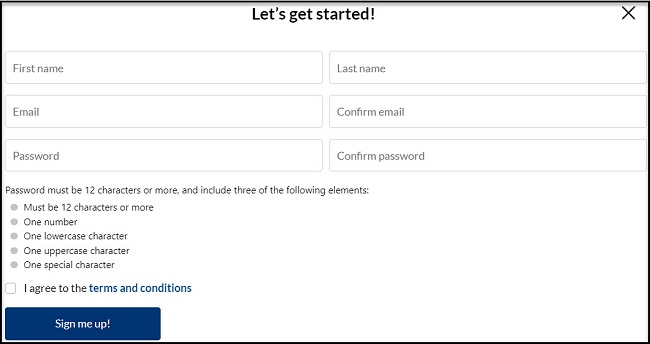
Click the 'Sign me up!' button at the bottom of your 'MyStratford' login screen.

- Enter your First name and Last name.
- Enter your email address and confirm email.
- Enter your password and confirm password.
- Review and agree to the Terms and Conditions.
- Click on 'Sign me up!'
Sign up using an existing social media account
- Click on the social media account (Facebook, Twitter, Google) you would like to use to sign up for MyStratford.
- Complete the login instructions to finish signing up for your MyStratford by using your existing social media login.
Add your address to your account (Optional)
Please note that it is not mandatory to add an address to create or use the MyStratford portal.
If you choose to add your address, the portal will automatically display the information related to your address such as:
- Road Closures
- Report a Problem
- Parking
- Recreation
- Transit
To Add the address:
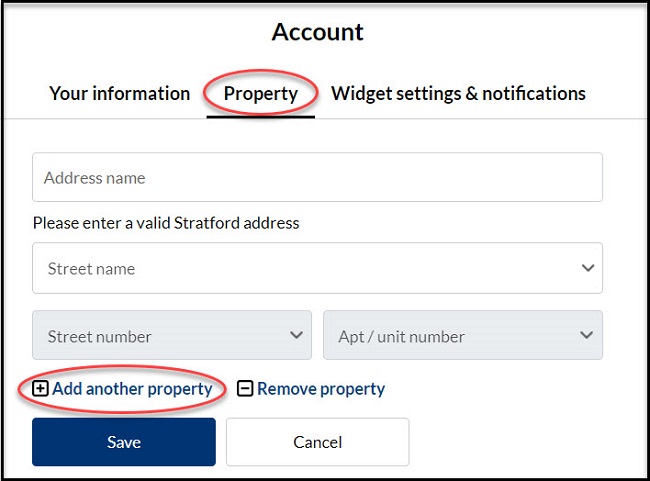
- Start typing your street name and the drop-down will populate.
- Select your street name from the dropdown list.
- The street number field will be enabled and you can choose your house number.
- If applicable, you can choose the unit number from the Apt/Unit number field.
- Click 'Next'.
If you do not want to add your address, select 'Maybe later'
Verify your account
- You will receive a verification email to confirm that you sign up for MyStratford.
- Click on the link in the verification email.
- Now you are ready to log into MyStratford.
Please note, If you do not see a verification email, check your spam or junk folder.